Practical guide
Smart Feed Slow Feed: Fifteen Minutes and the 1/8-Cup Limit
Smart Feed spreads eligible meals over fifteen minutes. Its minimum delivery is 1/8 cup, so a 1/8-cup meal cannot be divided into smaller Slow Feed portions.
Slow Feed changes delivery timing
For Smart Feed models PFD00-15788/PFD00-16828, current PetSafe support describes Slow Feed as a setting that slows the conveyor’s delivery into the bowl. It divides an eligible meal and dispenses it over a fifteen-minute period. [1]
Keep that statement about the equipment. It does not establish that a pet takes fifteen minutes to eat, that each delivery is an equal measured mass or that the mode prevents illness. This article has not timed a device or watched a pet eat. If the reason for changing feeding is a health concern, use the individualized veterinary advice already appropriate for the pet.
Keep the minimum delivery separate from meal size
| Quantity | Maker’s stated role | Interpretation |
|---|---|---|
| 1/8 cup | Smallest amount that can be dispensed | A meal already this size cannot be split into smaller Slow Feed portions. |
| Larger than 1/8 cup | Eligible size described for Slow Feed | The setting can spread delivery over fifteen minutes; actual output still needs observation. |
| 1/8 to 4 cups | Product’s per-meal setting range | A device range is not a nutritional recommendation or an exact mass. |
| Fifteen minutes | Described delivery period | It does not measure eating speed, intake or mechanical accuracy. |
On a phone, scroll inside the table. Keyboard users can focus it and use the arrow keys.
A volume setting is not grams. The same labelled cup quantity can have a different mass for a different food, and a manufacturer’s minimum does not determine the amount appropriate for your pet. Keep the intended meal amount with the actual food identity.
Do not enlarge a 1/8-cup meal merely to make Slow Feed eligible. That would change the amount, rather than explain why this delivery mode cannot subdivide the minimum. A dietary change is a separate question.
Use the actual Smart Feed Schedule control
- Open MyPetSafe and select the actual Smart Feed under Products.
- Open Schedule in the bottom menu.
- Use the Slow Feed slide; the support page describes blue as on.
- Review the actual intended meal amount and saved times, then observe the result at an appropriate supervised meal.
The manufacturer illustrations show a Schedule menu and the Slow Feed toggle. They are reference images, not proof that a setting was activated on a live device. If your app layout differs, use the current support route for your model.
Smart Feed FeedNow can also request an extra meal; it is not a substitute for reviewing the planned mode. Record manual requests separately using the existing extra-meal guide.
Keep a full delivery observation before judging amount
A bowl inspection during the delivery window may show only part of the intended output. Keep the setting, event start, observation time and complete result together. This supports a timing interpretation without declaring every small observation a mechanical failure.
If output remains incorrect after a complete relevant observation, the amount-check guide follows PetSafe’s food level, refill priming and conveyor branches. A connected app or a blue mode toggle does not establish an accurate portion.
The fifteen-minute description does not supply a universal interval per conveyor movement or an exact number of subdivisions for every meal. Leave those unobserved details out of the record.
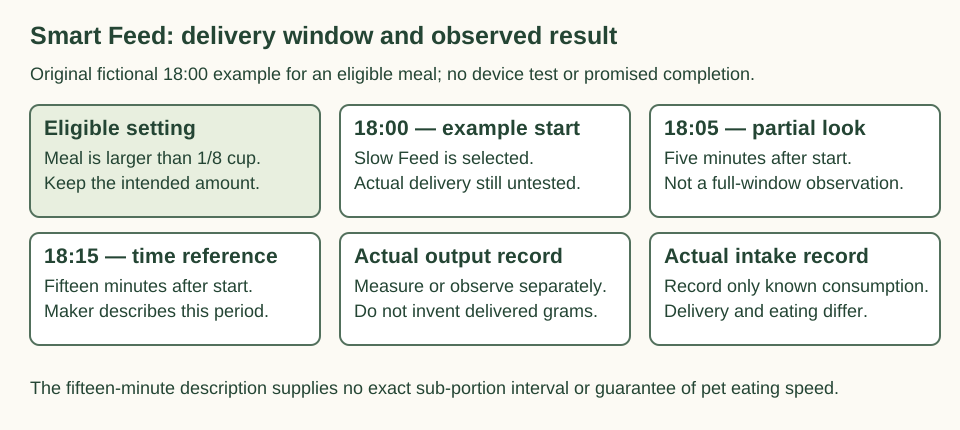
On a narrow screen, scroll within the diagram. Keyboard users can focus its region and use the arrow keys. Open the complete planning diagram
Three complete mode-reading cases
Case 1
A fictional saved meal is 1/8 cup. The owner expects Slow Feed to divide it into two 1/16-cup outputs. What contradicts current support?
Show answer and explanation for case 1
The smallest stated output is 1/8 cup, so the minimum meal cannot be subdivided into those smaller portions.
Two halves would equal the requested volume mathematically, but the source’s minimum constrains the device behavior. Arithmetic cannot add an unsupported 1/16-cup delivery mode.
Case 2
A fictional eligible meal starts at 18:00 with Slow Feed enabled. Someone looks at the bowl at 18:05 and calls the partial observation the completed meal. What is missing?
Show answer and explanation for case 2
A complete observation over the described delivery period and an actual final result.
18:05 is five minutes after the start, while the described period is fifteen minutes. Ten minutes remain numerically; this example does not demonstrate that a device actually completed delivery at 18:15.
Case 3
A fictional owner raises a 1/8-cup meal to 1/4 cup solely to make Slow Feed available. Has only delivery speed changed?
Show answer and explanation for case 3
No. The setting has doubled the intended volume as well as changing eligibility.
1/4 divided by 1/8 is two. The mode’s minimum does not justify that dietary change, and the volume calculation does not establish the mass or nutritional suitability.
Sources and further reading
- What is Slow Feed and How Do I Use it on My PetSafe® Smart Feed Complete current official main checked 16 November 2026. The selected maker illustrations were inspected separately; no device, account or feeding operation was performed.
- PetSafe Smart Feed model supportComplete current official main checked 16 November 2026. The selected maker illustrations were inspected separately; no device, account or feeding operation was performed.